Maintain Inventory
Effortlessly manage inventory across multiple branches and warehouses with our top-tier inventory management software in India. Keep track, organize, and oversee stock levels efficiently, ensuring optimal inventory levels to meet demand and supply. By streamlining stock maintenance, you can fulfill orders promptly, minimize dead stock, and enhance customer satisfaction with the best inventory management software.
Create Groups
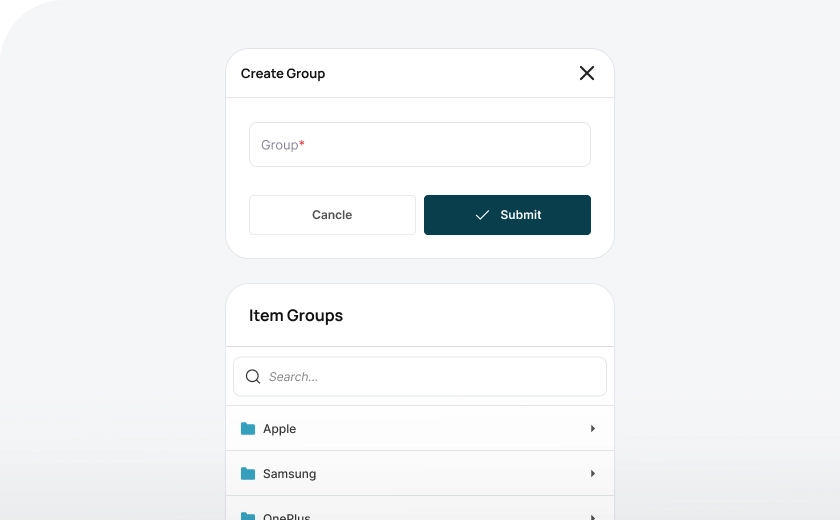
With Wortal Inventory Management Software you can manage both product and service inventory. You can organize your inventory into groups based on specific categories or based on a process hierarchy, making it easier to track and manage everything according to your business structure. This simple organization ensures better control and efficiency in handling your inventory.
Create Sub-Groups
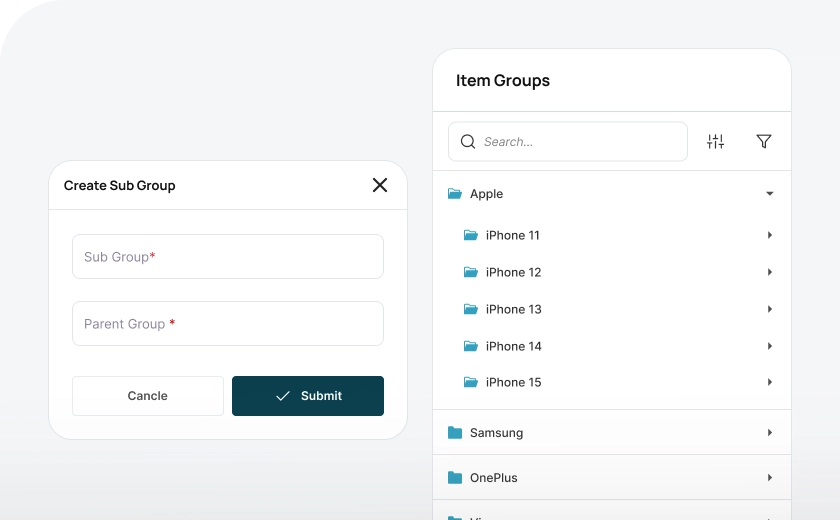
You can group your inventory based on your business needs and product categories, allowing for a clear and organized structure. Additionally, you can create sub-groups within these categories to establish an inventory hierarchy. This setup enables you to maintain a well-organized system and generate detailed reports, segmented by category or sub-group, helping you track and manage your inventory more effectively.
Create Inventory
Single Inventory
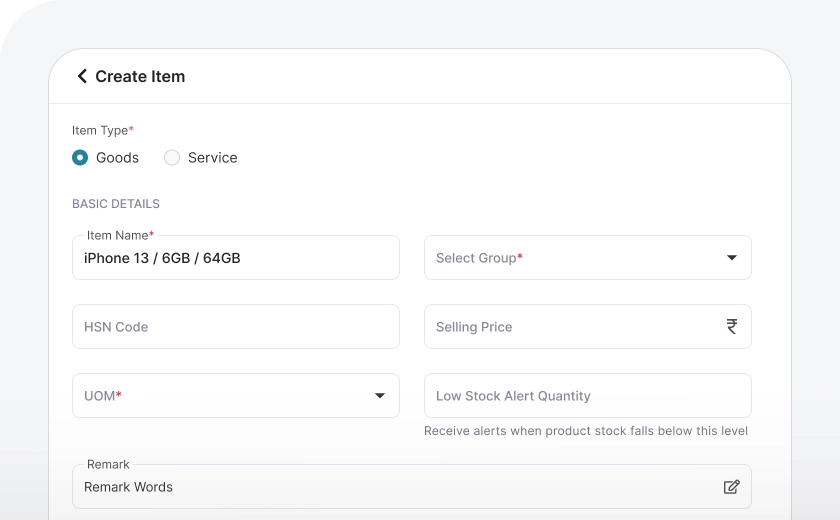
You can easily add inventory by clicking the "Create New" button and filling in the required fields. Whether you're adding goods or services, the process is simple. Just enter details such as the item name, group, HSN code, GST details, product description, and upload product images. Once all the information is filled in, you can save the record, ensuring that your inventory is accurately updated and ready for management.
Bulk Inventory
To add inventory in bulk, you can specify the attributes of variation, such as color, size, or other product features. For example, if you're adding t-shirts available in 3 colors and 4 sizes, the system will automatically create 12 unique items based on the different combinations of these variations.
Inventory Import
You can easily import inventory in bulk into Wortal by uploading an Excel or CSV file. Simply click the "Import" button, download the template, fill in the required data, and upload the completed template. With these simple steps, you can quickly capture and manage bulk inventory in your inventory Management Software.
Integrate
With Wortal's integrated CRM platform, you can capture all your inventory in real time from accounting softwares. Now sales team will be aware of available stock to sell and preparing quotation will be an ease with wortal inventory management software.
Frequently Asked Questions
Everything you need to know about the Wortal CRM.
What does it mean to maintain inventory?
Maintaining inventory means keeping track of stock levels, ordering new items when needed, and ensuring products are available for customers. It involves monitoring what’s in stock, what’s sold, and what needs restocking. Effective inventory maintenance helps prevent stockouts and overstocking. This keeps operations running smoothly and customers satisfied.
Why is inventory maintenance important?
Proper inventory maintenance prevents shortages, reduces waste, and saves money on excess stock. It ensures you have the right products when customers need them, improving customer satisfaction. Good inventory control also helps businesses avoid costly last-minute orders. It makes inventory management more efficient and cost-effective.
What tools help with inventory maintenance?
Inventory management software, barcode scanners, and automated alerts are useful tools for maintaining inventory. These tools make it easy to track stock levels in real-time and get notifications when items need reordering. Many systems offer features for tracking sales trends and inventory turnover. This helps businesses stay organized and proactive.
How do I know when to reorder inventory?
How can I avoid overstocking?
You can avoid overstocking by using methods like Just-In-Time (JIT), which involves ordering only what you need based on demand. Monitoring sales trends and seasonal demand helps with accurate ordering. Inventory software can also help with forecasting needs. This approach saves on storage costs and reduces waste.
What’s the best way to organize inventory?
Organizing inventory by categories, such as by product type, popularity, or expiration date, helps with easy access and tracking. Using labels or barcodes also makes it faster to locate items. Regularly reviewing and adjusting organization methods keeps the system efficient. Good organization makes inventory checks quick and accurate.
How often should I review my inventory?
Regular reviews, such as weekly or monthly, help ensure stock levels match customer demand and identify slow-moving items. Frequent checks also help you spot any discrepancies or potential issues early on. Reviewing inventory regularly prevents unexpected stockouts or excess. It keeps inventory data up-to-date and reliable.