
A CRM, or Customer Relationship Management system, is software that helps a business store customer information, manage leads, track sales opportunities, schedule follow-ups, and keep the sales team organised in one place. Free CRM software gives startups and small businesses access to these basic CRM functions without paying a regular subscription.
The reason businesses look for a CRM is simple. Once leads start coming from WhatsApp, websites, phone calls, social media, referrals, marketplaces and salespeople, spreadsheets stop being reliable. A CRM creates one place where the business can see who the customer is, what was discussed, what stage the deal is in, and what needs to happen next.
But there is a catch.
Not every free CRM is actually suitable for a growing business. Some limit the number of users. Some restrict contacts. Others provide a free CRM but keep important sales automation features behind a paid plan.
So the right question isn’t simply, “Which CRM is free?”
It is:
Which free CRM can handle the way my business actually sells?
Book a Free Demo
See how Wortal can simplify your business and help you close more deals.


Quick Summary
This guide compares 10 CRM platforms that startups and small businesses can consider:
- Wortal
- HubSpot CRM
- Zoho CRM
- Freshsales
- Bitrix24
- EngageBay
- Brevo
- Vtiger CRM
- Capsule CRM
- SuiteCRM
The comparison covers features, free-plan limitations, pricing, strengths, weaknesses and the type of business each platform suits best.
One important point: a free plan can be excellent for a two person startup but completely inadequate for a 10 person sales team. Always check the user, contact, deal and automation limits before moving your customer data.
What Should Free CRM Software Actually Do?
A useful CRM should do more than save phone numbers.
At a minimum, a startup should be able to:
- Store leads and customer information
- Track sales opportunities
- Create different sales stages
- Set follow-up reminders
- Record calls, emails or conversations
- Assign leads to team members
- Track activities
- View sales reports
- Access customer information from mobile
- Export or migrate data when necessary
For example, imagine a machinery distributor receives 30 inquiries every day.
Ten come through WhatsApp, eight through IndiaMART, five through phone calls, four through referrals and three through the website.
Without a CRM, these inquiries may sit in different phones, WhatsApp chats and Excel files.
With a CRM, the basic process becomes:
Lead Management Workflow
A structured process from the first inquiry to the final sales outcome.
-
01 New Inquiry
-
02 Lead Created
-
03 Lead Assigned
-
04 First Call
-
05 Follow-up
-
06 Quotation
-
07 Negotiation
-
08 Won / Lost
That visibility is the real value of CRM.
List of 10 Free CRM Software For Startups & Small Businesses
1. Wortal – Best for Indian SMBs, Sales Teams & Growing Businesses
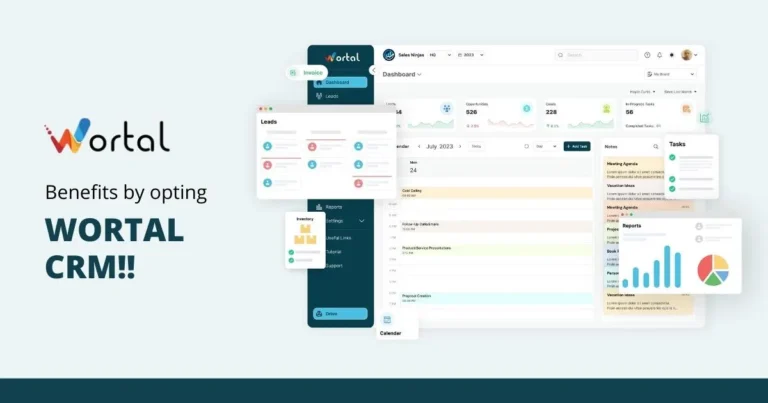
Wortal is a mobile-first CRM and business management platform built around sales, leads, follow-ups, quotations, calling, WhatsApp communication, inventory and team management.
It is particularly interesting for Indian businesses where sales happen through a mix of WhatsApp, phone calls, field visits, websites and B2B portals rather than only through email.
Wortal supports lead management, visual sales pipelines, WhatsApp integration, built-in calling, quotations, GST invoicing, reports and analytics. It also connects CRM activity with inventory and task management, which can be useful for businesses selling physical products.
Free option
Wortal has a dedicated startup program that provides eligible DPIIT recognised startups with CRM access free for one year. The eligibility is based on the startup’s incorporation date and valid DPIIT recognition.
For businesses outside the startup program, Wortal offers a free-start option and paid plans. Its published pricing currently lists:
- Standard: Rs.200/user/month
- Premium: Rs.350/user/month
A free trial is also available.
Key features
- Lead management
- Visual sales pipeline
- WhatsApp integration
- Built-in calling
- Call recording and history
- AI call summaries
- Follow-up reminders
- Quotation management
- GST invoicing
- Reports and analytics
- Inventory management
- Order management
- Task management
- Mobile access
- B2B lead integrations
Wortal can capture leads from sources such as IndiaMART, JustDial, TradeIndia, Meta Ads and website forms, depending on the configured integrations.
Pros
- Designed with Indian SMB workflows in mind
- Strong WhatsApp and calling features
- Useful for businesses selling physical products
- CRM can connect with inventory and orders
- Suitable for textile, real estate, IT/SaaS, machinery, education, automobile and other sales-driven businesses
- Mobile-first approach
Cons
- Businesses looking for a very simple contact-only CRM may find its wider feature set unnecessary
- Advanced business workflows may require a paid plan
Best for
Indian startups, manufacturers, wholesalers, distributors, textile businesses, real estate teams and SMB sales teams that need CRM plus operational visibility.
2. HubSpot CRM – Best for Beginners
HubSpot is one of the most recognisable names in CRM software.
Its free CRM is designed to help businesses manage contacts, deals and tasks without immediately committing to a paid CRM subscription.
The current free plan includes contact management, deal pipelines, CRM import, reporting dashboards and several sales tools. HubSpot states that its free CRM has no expiration date.
Free plan
The free CRM currently supports up to two users and 1,000 contacts.
Key features
- Contact management
- Deal management
- Sales pipeline
- Tasks
- Email tracking
- Email templates
- Meeting scheduling
- Documents
- Live chat
- Sales quotes
- Reporting
Pros
- Very easy to start
- Strong user interface
- Large ecosystem
- Good educational resources
- Useful integrations
Cons
- Free limits become restrictive for larger teams
- Advanced automation requires paid products
- Businesses can end up paying for additional HubSpot functionality as they grow
Best for
Very early-stage startups, consultants, agencies and small teams that want a polished CRM and have a relatively small number of users.
3. Zoho CRM – Best All-Rounder for Small Teams
Zoho CRM has one of the more practical free editions for very small teams.
Its free edition is available for up to three users and includes contact management, follow-up reminders, workflow automation, email templates, tasks, meetings, calls, reports, data import/export and mobile apps.
Free plan
Rs.0 for up to 3 users.
Zoho says the free edition is available indefinitely rather than being a short trial.
Key features
- Leads
- Contacts
- Deals
- Tasks
- Calls
- Follow-up reminders
- Workflow automation
- Reports
- Web forms
- Email templates
- Mobile CRM
- API access
Pros
- Good feature-to-price ratio
- Strong ecosystem
- Good automation capabilities
- Suitable for Indian businesses
- Easy upgrade path
Cons
- Interface can feel more complicated than simpler CRMs
- Advanced reporting and automation are mainly paid features
- Larger teams will need a paid plan
Best for
Startups and small businesses that want a traditional CRM with room to grow.
4. Freshsales – Best for Sales-Focused Teams
Freshsales from Freshworks focuses heavily on sales teams.
Its current free plan supports up to three users and includes basic CRM functionality such as contact, account and deal management, Kanban views, sales activities, dashboards and integrations.
Free plan
$0 for up to 3 users.
Key features
- Contact management
- Account management
- Deal management
- Kanban sales pipeline
- Tasks
- Appointments
- Notes
- Sales dashboard
- Email tools
- Integrations
- Mobile access
Pros
- Sales-oriented interface
- Good for teams that think in deals and pipelines
- Freshworks ecosystem
- Relatively easy to understand
Cons
- Free plan is limited to a very small team
- Advanced AI and automation features require paid plans
- Businesses may outgrow the free version quickly
Best for
Startups with two or three salespeople that want a dedicated sales CRM rather than a broad business platform.
5. Bitrix24 – Best for CRM + Team Collaboration
Bitrix24 is different from a traditional CRM because it combines CRM with tasks, project management, calendars, communication and collaboration tools.
Its free plan includes basic CRM, tasks, shared calendars, chat and video calls, with 5 GB of storage. The current pricing page presents the free tier as a limited plan for very small teams.
Key features
- Contacts
- Deals
- Basic CRM
- Tasks
- Kanban
- Gantt
- Calendars
- Chat
- Video calls
- Team collaboration
- File storage
Pros
- More than just CRM
- Useful for distributed teams
- CRM and project management in one system
- Many business tools available
Cons
- Interface can feel crowded
- More features can mean more setup
- Some sales and automation features require paid plans
Best for
Small companies that need CRM, task management and internal collaboration in the same platform.
6. EngageBay – Best for CRM + Marketing on a Budget
EngageBay combines CRM, sales, marketing automation, email marketing, landing pages, helpdesk and live chat.
Its free plan currently includes 250 contacts/companies along with CRM, deals, tasks, email tracking, appointment scheduling and live chat.
Key features
- Contact management
- Deals
- Tasks
- Email tracking
- Appointment scheduling
- Email sequences
- Landing pages
- Live chat
- Marketing automation
- Lead scoring
- Reports
Pros
- Combines sales and marketing
- Good feature range for the price
- Useful for lead-generation businesses
- Includes marketing functionality
Cons
- Free contact limit is relatively low
- The platform can feel broad for businesses wanting only CRM
- Advanced features require upgrades
Best for
Startups that generate leads through digital marketing and want CRM and marketing tools together.
7. Brevo – Best for Email-First Customer Management
Brevo is better known for email and customer communication, but it also provides CRM and sales functionality.
Its free plan includes one user, up to 100,000 contacts for the marketing database, 300 daily email sends and sales tools such as a pipeline, tasks, reminders, forecasting and meeting scheduling. The free sales functionality is limited to 50 open deals and one pipeline.
Key features
- Contact management
- Deal management
- Sales pipeline
- Tasks
- Meeting scheduling
- Email campaigns
- SMS
- Basic reporting
- Marketing automation
Pros
- Strong email marketing
- Large contact allowance for marketing
- Useful communication tools
- Good option for email-led businesses
Cons
- Free sales functionality is limited
- One pipeline can become restrictive
- Advanced sales automation is paid
Best for
Small businesses where email marketing is as important as sales pipeline management.
8. Vtiger CRM – Best for Businesses Wanting CRM + Operations
Vtiger takes a broader approach to CRM by combining sales, marketing, help desk, inventory and business processes.
Its free Pilot plan currently allows up to 10 users and 3,000 records. It includes lead and contact management, deals, sales pipelines, tasks, email functionality, basic automation and mobile access.
Key features
- Lead management
- Contact management
- Deal management
- Sales pipeline
- Email sequences
- Tasks
- Help desk
- Marketing campaigns
- Inventory
- Reports
- Mobile app
Pros
- Generous free user allowance
- Broader business functionality
- Useful for growing SMBs
- CRM and support features in one system
Cons
- More features mean a longer learning curve
- 3,000 record free limit needs monitoring
- Advanced AI and automation are paid
Best for
Small companies that need CRM today but expect to add support, inventory or marketing workflows later.
9. Capsule CRM – Best for Simple Relationship Management
Capsule takes a simpler approach.
Its free plan is designed for very small teams and currently supports two users and 250 contacts. It includes basic contact management, one sales pipeline, custom fields and sales milestones.
Key features
- Contact management
- Sales pipeline
- Custom fields
- Sales milestones
- Tasks
- Email connection
- Customer history
Pros
- Simple interface
- Easy to learn
- Good for relationship focused selling
- Less overwhelming than larger CRM platforms
Cons
- Only two users on the free plan
- 250 contacts is a small limit
- Advanced automation requires paid plans
Best for
Consultants, freelancers, small agencies and tiny businesses that mainly need contact and opportunity tracking.
10. SuiteCRM – Best for Businesses Wanting Open-Source CRM
SuiteCRM is different from most of the tools on this list.
It is open-source CRM software. There is no per-user software licence fee, but that does not mean running it costs nothing. Businesses still need to consider hosting, setup, maintenance, configuration and support. SuiteCRM itself highlights this distinction in its current pricing model.
Key features
- Lead management
- Contact management
- Accounts
- Opportunities
- Sales forecasting
- Reporting
- Workflow management
- Customisation
- Open-source architecture
Pros
- No per-user licence fee
- Highly customisable
- Full control over deployment
- Suitable for businesses with technical resources
Cons
- Hosting needs to be managed
- Setup requires more technical knowledge
- Maintenance is the business’s responsibility unless outsourced
Best for
Businesses that have technical resources and want more control over their CRM environment.
Free CRM Software Comparison
| CRM | Free Option | Best For | Main Strength | Main Limitation |
|---|---|---|---|---|
| Wortal | 1-year startup program for eligible DPIIT startups + free-start option | Indian SMBs | Sales + WhatsApp + calling + business workflows | Advanced features may require paid plan |
| HubSpot | Free | Early-stage teams | Ease of use | 2-user limit |
| Zoho CRM | Free for 3 users | Small businesses | Balanced CRM | Advanced features paid |
| Freshsales | Free for 3 users | Sales teams | Sales pipeline | Small free team |
| Bitrix24 | Free | Collaboration-heavy teams | CRM + tasks | Can feel complex |
| EngageBay | Free | Sales + marketing | All-in-one features | 250 contacts |
| Brevo | Free | Email-first businesses | Email + CRM | 50 open deals |
| Vtiger | Free for up to 10 users | Growing SMBs | CRM + operations | 3,000 records |
| Capsule | Free for 2 users | Tiny teams | Simplicity | 250 contacts |
| SuiteCRM | Open-source | Technical teams | Customisation | Hosting/setup required |
Which Free CRM Is Best for Your Business?
There is no universal winner.
The better choice depends on how your business sells.
Choose Wortal if:
- Your sales team relies heavily on WhatsApp
- You receive leads from multiple channels
- You sell physical products
- You need quotations and GST invoices
- You need calling and follow-up tracking
- You manage inventory along with sales
- You have field salespeople
- You are an Indian startup eligible for the startup program
Choose HubSpot if:
- You want something easy to learn
- You have a very small team
- Marketing is important
- You want a large integration ecosystem
Choose Zoho if:
- You want a traditional CRM
- You have up to three users initially
- You want automation
- You expect your CRM requirements to grow
Choose Freshsales if:
- Sales is the main focus
- You have a small sales team
- You prefer a clean sales pipeline
Choose Bitrix24 if:
- CRM and project management need to sit together
- Your team needs collaboration tools
Choose EngageBay if:
- Marketing generates most of your leads
- You want CRM and email marketing together
Choose Brevo if:
- Email communication is central to your business
- You want a large marketing contact database
Choose Vtiger if:
- You need CRM plus support or operations
- You want more users on the free plan
Choose Capsule if:
- You want a very simple CRM
- Your team is tiny
- You don’t need complicated automation
Choose SuiteCRM if:
- You have technical expertise
- You want open-source control
- You are comfortable managing hosting
How to Choose Free CRM Software: A Practical Framework
Don’t start by comparing 50 features.
Start with your daily workflow.
Ask these seven questions:
1. Where do leads come from?
Website? WhatsApp? IndiaMART? Instagram? Phone calls? Walk-ins?
2. How many people need access?
A CRM that is free for two users isn’t really a free CRM for a 10 person sales team.
3. How many leads do you manage?
Check contact and record limits before migrating your database.
4. How does your team follow up?
If your business runs mostly through WhatsApp and calls, email-heavy CRM features may not solve your real problem.
5. Do you sell products or services?
A manufacturer or distributor may need quotations, stock and order information alongside CRM.
6. Do you need automation?
Ask whether the automation you actually need is included in the free version.
7. What happens when you grow?
A CRM should have a sensible upgrade path. Moving 5,000 customer records from one CRM to another is not something you want to do every year.
Common Mistakes Businesses Make When Choosing a Free CRM
Mistake 1: Choosing based only on price
Rs.0 is attractive.
But if the free version doesn’t support your sales process, you haven’t saved money. You have only delayed the decision.
Mistake 2: Ignoring user limits
A founder may happily use a CRM alone.
Six months later, there are five salespeople.
Suddenly the free plan isn’t enough.
Mistake 3: Looking only at contact limits
Contacts aren’t the only limit that matters.
Check:
- Users
- Deals
- Pipelines
- Automation
- Emails
- Storage
- API calls
- Reports
- Integrations
Mistake 4: Forgetting mobile usage
Salespeople aren’t always sitting in front of laptops.
For a field-sales business, mobile access can matter more than a beautiful desktop dashboard.
Mistake 5: Treating CRM as an address book
The real purpose of CRM is not simply storing customer names.
It is answering questions such as:
Which leads are waiting for follow-up?
Which salesperson owns them?
Which quotations are pending?
Which deals are likely to close?
Which leads have gone cold?
That is where CRM starts becoming useful.
Real-Life Style Case Study: A Growing Textile Distributor
Consider a textile distributor with eight salespeople.
Most inquiries arrive through WhatsApp, phone calls and B2B marketplaces. Salespeople also meet retailers personally.
Initially, the company used Excel for customer information and individual phones for communication.
The problems were predictable:
- Leads were scattered
- Follow-ups depended on memory
- Managers couldn’t see salesperson activity
- Quotations were prepared manually
- Customer information stayed on individual phones
- Stock questions required calls to the office
- When an employee left, customer history became difficult to recover
The company needed more than a basic contact database.
It needed the sales process to become visible.
Implementation
The business moved its lead information into a CRM and created stages such as:
Sales Pipeline Workflow
Track every lead from initial contact to the final sales outcome.
-
01
New Lead
Capture and record a new prospect.
-
02
Contacted
Reach out and initiate communication.
-
03
Requirement Confirmed
Understand and confirm customer needs.
-
04
Quotation Sent
Share pricing and the proposed offer.
-
05
Negotiation
Discuss terms, pricing and objections.
-
06
Order Confirmed
Finalize the deal and confirm the order.
-
07
Lost / Won
Record the final deal outcome for reporting.
Every salesperson received assigned leads.
Follow-up dates were recorded.
Customer conversations and quotation activity were connected to the relevant customer or opportunity.
For a business with this kind of workflow, a platform such as Wortal can be useful because CRM activity can sit alongside quotation, calling, WhatsApp, inventory and order workflows rather than being treated as a completely separate system.
Result
The biggest improvement isn’t necessarily “more software.”
It is visibility.
The owner can now ask:
- How many leads came in this week?
- Who owns each lead?
- How many quotations are pending?
- Which salesperson has the most active opportunities?
- Which customers haven’t been contacted recently?
That is what a CRM should ultimately provide: control over the sales process.
Expert Insight: When Should You Stop Using a Free CRM?
A free CRM is a good starting point.
But there is a point where upgrading makes financial sense.
Consider moving to a paid plan when:
- Your team has exceeded the free user limit
- You are regularly hitting contact limits
- You need multiple pipelines
- You need advanced automation
- Managers require detailed reporting
- You need role-based permissions
- Your sales process has become more complex
- Manual work is costing more than the subscription
A useful calculation is:
CRM cost per month ÷ additional deals generated = CRM cost per additional deal
If a Rs.5,000 monthly CRM expense helps the team close even one additional Rs.50,000 order, the discussion is no longer about software cost alone.
It becomes a sales productivity decision.
Key Takeaways
- Free CRM software can be enough for a very small business.
- “Free” does not mean every CRM has unlimited users or contacts.
- HubSpot is strong for beginners and very small teams.
- Zoho CRM is a strong general-purpose option for small teams.
- Freshsales is particularly suited to sales-focused teams.
- Bitrix24 works well when CRM and collaboration need to sit together.
- EngageBay is useful when marketing and CRM need to work together.
- Brevo is strongest for businesses centred around email communication.
- Vtiger provides a relatively broad free CRM option for small teams.
- Capsule is a good choice when simplicity matters more than advanced features.
- SuiteCRM makes sense for businesses that want open-source control.
- Wortal is particularly relevant to Indian SMBs that need sales CRM alongside WhatsApp, calling, quotations, inventory and business workflows.
- Before choosing a CRM, check users, contacts, deals, automation, integrations and mobile access.
- The best CRM is the one your sales team actually uses every day.
Conclusion
A CRM does not have to be expensive to be useful.
For a two-person startup, a simple free CRM may be all that’s needed. For a growing sales organisation, however, the limits of a free plan can become more important than the Rs.0 price tag.
The smarter approach is to start with your actual sales process.
Where do leads come from? How does your team follow up? How are quotations created? Who owns the next action? What happens when a salesperson leaves? And can the owner see what is happening without calling five people?
Those questions will tell you more about the right CRM than a feature checklist ever will.
For Indian startups and small businesses that sell through WhatsApp, calls, field sales, quotations and multiple lead sources, Wortal is worth considering because it brings sales CRM together with calling, WhatsApp, quotations, invoicing, inventory and team workflows.
The businesses that get the most from CRM aren’t necessarily the ones with the most features.
They are the ones where every lead has an owner, every opportunity has a next step, and every customer interaction is recorded somewhere the team can actually find it.
FAQs
Frequently Asked Questions About Free CRM Software
Find answers to common questions about free CRM tools, startup plans, features and choosing the right CRM for your business.