

Time Sheet Software Track Where Your Team’s Time Actually Goes
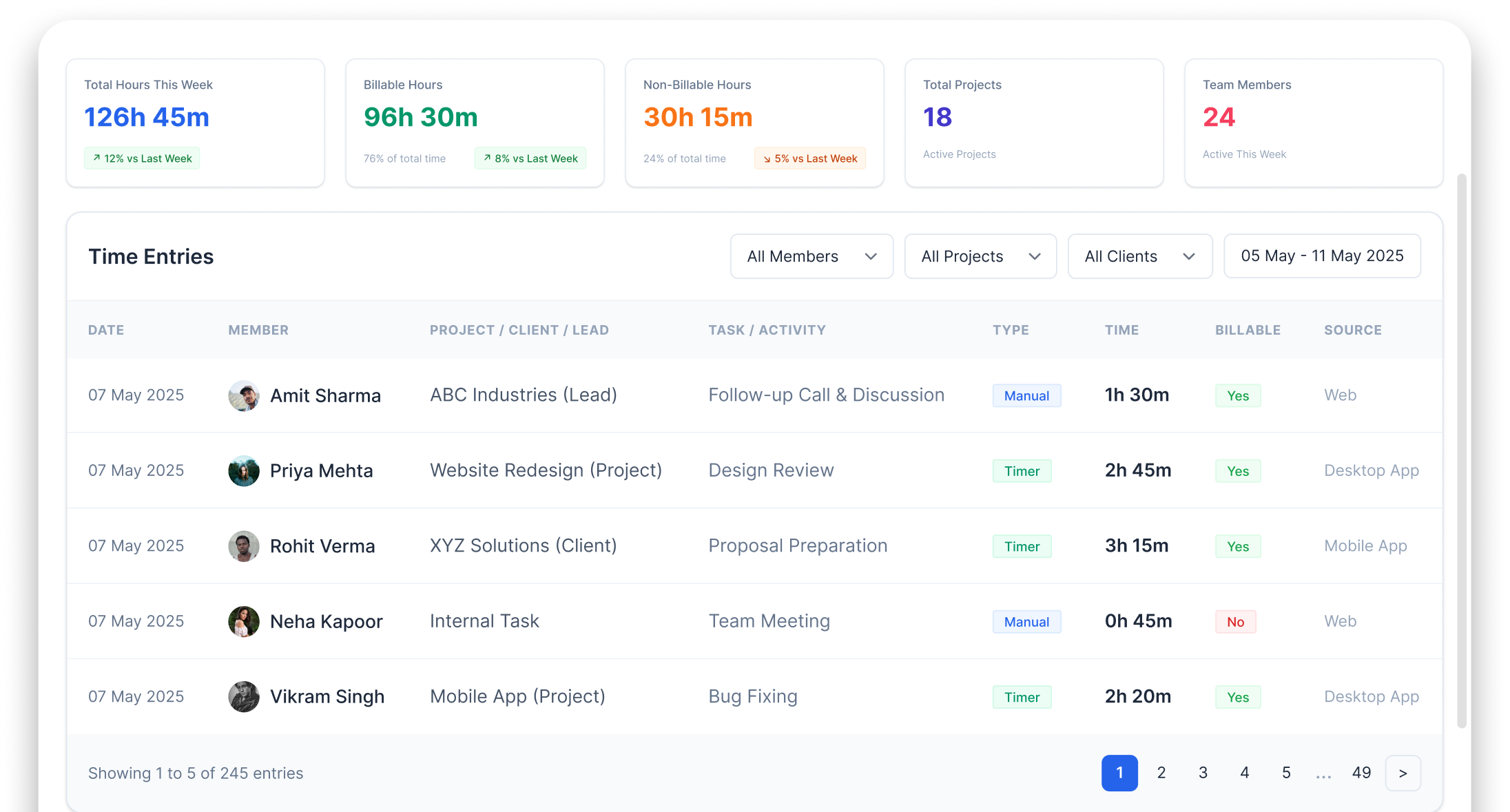
Track hours spent per lead, per task, per client, per project. Automated time logs, manual entries, daily/weekly summaries know exactly where time is invested
Your team spends 2 HOURS daily on tasks a machine should do
Repetitive work is stealing your selling hours


No visibility into time spent
Everyone looks busy. But how much time on actual selling vs admin work? How many hours on Client A vs Client B? Nobody knows

Can't track billable hours
For service businesses — you're doing 40 hours of work for a client but billing only 25 because you never tracked properly

Overloaded vs idle team members
Some people work 12 hours, some finish by 4pm. Without time data, you can't rebalance workload fairly

End-of-day guessing
Team fills timesheet at 6pm trying to remember what they did at 10am. Inaccurate data, useless reports
Track EVERY MINUTE OF WORK Without Manual Effort
Auto Time Logging
Time auto-tracked when team works on tasks, leads & projects in Wortal
Manual Entry Option
Team can manually log time for meetings, calls & offline activities
Daily Summary
End of day complete time breakdown per activity, task & client
Weekly/Monthly Reports
Managers get automated weekly & monthly time reports per team member
TIME TRACKING Made Simple
Capture work hours automatically, manage timesheets, and generate detailed productivity reports.
Automatic Time Tracking
Time auto-logged when team works on tasks, leads & projects within Wortal
Manual Time Entry
Log time for meetings, calls, travel & offline activities manually
Client/Project-Wise Hours
See exactly how many hours spent on each client, project or account
Daily & Weekly Summaries
Auto-generated time summaries per person, per day, per week
Billable vs Non-Billable
Categorize time as billable or non-billable essential for service businesses
Export-Ready Reports
Time reports exportable to Excel for payroll, billing & analysis
Business Benefits of TIME SHEET
Prevent proxy attendance, automate reporting, and maintain accurate attendance records across all locations.
Know Where Time Goes
Stop guessing. See actual time data per person, per task, per client

Track Billable Hours
Service businesses can track & bill accurate client hours
Better Resource Planning
Know who’s overloaded, who’s underutilized plan better

Accountability Without Micromanaging
Data speaks. No need to ask “what did you do today?”

Powering WORKFLOWS
Across Modules



Complementary Features You May Need
Monitor work hours, field activities, task progress, attendance, and productivity from one unified platform
GEO Attendance
Attendance first, then time tracking

Field Sales Tracking
Track field time along with location

Reports & Analytics
Time analysis dashboards

Task Management Product
Time tracked per task automatically
FAQ
Employees can log their hours effortlessly from their phone or computer. They just select the project or task they are working on and click a “Start Timer” button, or they can manually punch in their hours at the end of the day or week if they prefer.
Yes, absolutely. This is incredibly helpful for agencies, consultants, or contractors. You can see exactly how many hours your team spent on “Client X” or “Project Y,” making it very simple to evaluate which projects are profitable and which are taking up too much time.
Yes, Wortal features an easy approval workflow. At the end of the week, employees submit their timesheets for review. Managers get a clean dashboard to review the logged hours, and can approve or reject them with a single click before sending them to payroll.
Yes, you can set custom rules and caps for weekly or daily hours. If an employee tries to log hours beyond their standard shift or project allocation, the system can flag it for manager approval or send an alert before it gets recorded.
If you bill clients by the hour, Wortal can link your timesheets directly to your billing system. With a single click, you can pull a team member’s approved hours for a specific project straight onto a client’s invoice, ensuring your billing is perfectly accurate.
Every Hour Tracked. Every Minute Accounted For
Free setup · No credit card · Cancel anytime
