

Sales Pipeline Software See Every Deal’s Journey, from First Touch to Close
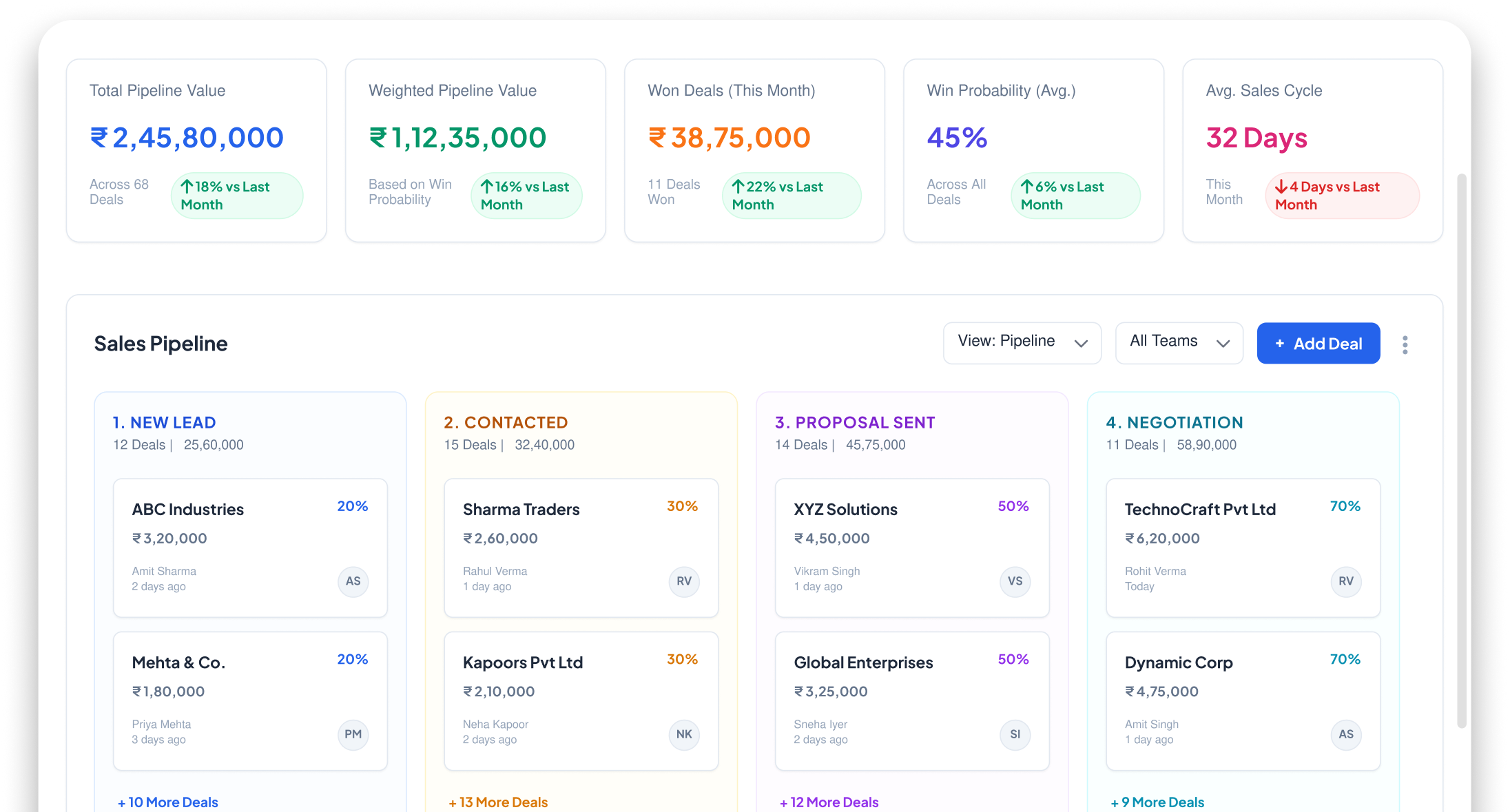
Visual Kanban-style pipeline with drag-and-drop. Track deal stages, values, win probability, team performance & revenue forecasts all in real time
How many DEALS are closing this month? Nobody knows
Deals are in heads, not dashboards


Deals tracked in Excel or memory
Your top sales rep has 20 deals 'in progress'. Where exactly? In their head. If they're sick tomorrow, those deals are invisible

Can't forecast revenue
Month-end meeting: 'How much revenue are we closing?' Everyone guesses. No data-backed forecast, no weighted pipeline

Deals stuck for weeks without action
A deal has been in 'Proposal Sent' for 3 weeks. Nobody noticed. No alert, no escalation. It's dead — and you don't know

No team-wise visibility
Who's carrying the most deals? Who's converting best? Who needs help? You can't coach what you can't see
From LEAD TO REVENUE Every Deal Stays on Track
Leads Enter Pipeline
Every qualified lead becomes a deal in your visual pipeline
Drag Through Stages
Move deals through stages New, Contacted, Proposal, Negotiation, Won/Lost
Track Value & Probability
Set deal value and win probability — pipeline shows weighted forecast
Close & Report
Won deals auto-update revenue. Lost deals logged with reasons for learning
Everything You Need to Manage Your Sales Pipeline
Visualize deals, forecast revenue, track performance, and move opportunities through every stage with confidence
Visual Kanban Pipeline
Drag-and-drop pipeline board. See all deals at a glance, organized by stage
Custom Pipeline Stages
Define your own stages Demo, Proposal, Negotiation, Approval, or whatever fits your sales process
Deal Value & Win Probability
Set expected value and probability per deal. Pipeline shows weighted revenue forecast
Multiple Pipelines
Separate pipelines for different products, teams or business lines
Revenue Forecasting
See projected revenue by month, quarter — based on deal values and probabilities
Stage-Wise & Team-Wise Reports
Which stage has most deals stuck? Which rep closes fastest? Data-driven insights
Gain Complete VISIBILITY AND PREDICTABLE Revenue Growth
Prevent proxy attendance, automate reporting, and maintain accurate attendance records across all locations
Full Deal Visibility
Every deal visible in one view nothing hidden, nothing forgotten

Accurate Revenue Forecasting
Weighted pipeline gives you realistic revenue projections not guesswork

Spot Stuck Deals
Deals sitting in one stage too long? Pipeline highlights them automatically

Better Team Management
See who’s performing, who needs help — coach with data, not opinions

Powering WORKFLOWS
Across Modules




Complementary Features You May Need
Track every sales opportunity with connected lead management, workflow automation, quotations, and performance analytics

Workflow Automation
Auto-trigger actions on stage changes

Lead Management
Feed your pipeline with qualified leads

Reports & Analytics
Deep pipeline analytics & forecasting

Quotation Management
Auto-trigger actions on stage changes
FAQ
A sales pipeline is a visual roadmap of your active deals. Wortal displays your deals as cards arranged in columns like “New Lead,” “Meeting Scheduled,” “Proposal Sent,” and “Negotiation.” You can easily see exactly how much potential revenue is sitting in each stage.
Yes, entirely. We know every business sells differently. You can easily add, delete, rename, or rearrange the columns in your pipeline to fit your exact workflow-whether you have a simple 3-step sales cycle or a complex 10-step enterprise process.
It’s as simple as drag-and-drop. When a client moves from reviewing a proposal to entering contract negotiations, you just click on their deal card and slide it over to the next column. The system updates everything behind the scenes instantly.
Yes, Wortal highlights stagnant deals. You can set rules so that if a deal card sits in the “Proposal Sent” column for more than 7 days without any notes or emails added, it changes color or shows a warning flag to prompt your team to reach out.
Yes. If your company sells different types of products, offers both retail and wholesale options, or manages separate domestic and international sales teams, you can create multiple distinct pipelines and switch between them seamlessly.
See Every Deal. Forecast Every Rupee
Free setup · No credit card · Cancel anytime
