

Workflow Automation Software Automate the Busywork, Focus on Growth
Auto-assign leads, trigger follow-up reminders, send WhatsApp messages, change deal stages — set rules once, let Wortal handle the rest on autopilot
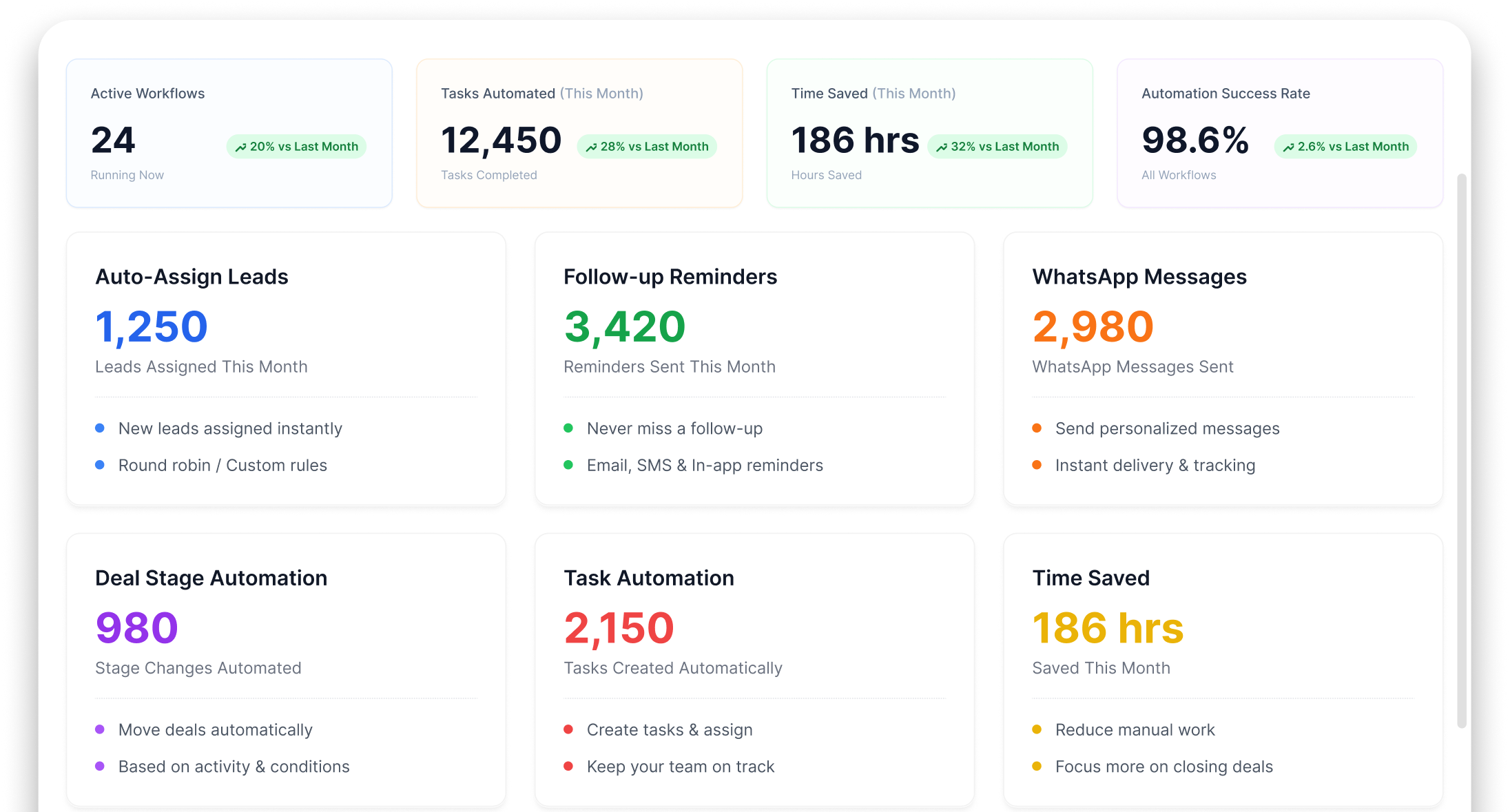
Your team spends 2 HOURS daily on tasks a machine should do
Repetitive work is stealing your selling hours


Manual lead assignment
New lead comes in. Someone checks who's free. Assigns manually. 10 minutes per lead × 50 leads = entire day wasted

Follow-up reminders forgotten
Team member meant to follow up today. Got busy. Forgot. Lead went cold. This happens 10-15 times daily

WhatsApp messages sent one by one
Your team sends the same follow-up message to 50 leads manually. Copy-paste, copy-paste an hour gone.

Status updates done by hand
Deal moved to negotiation? Someone has to manually update CRM, create task, notify manager. Or it just doesn't happen.
How WORKFLOW AUTOMATION Works
Choose a Trigger
When a lead comes in, when a deal moves, when a task is overdue pick the event
Set the Action
Auto-assign, send WhatsApp, create task, change status, send notification pick the action
Activate the Rule
Turn it on. The automation runs 24/7 without anyone touching it
Monitor & Optimize
See how many times each automation fired, what it did, and optimize
WORKFLOW AUTOMATION Made Simple
Create rules, automate actions, and ensure every lead, task, and follow-up is handled on time
If-Then Automation Rules
Create rules: IF [trigger] THEN [action]. Simple logic, powerful results
Auto Lead Assignment
New lead arrives → auto-assigned to right team member based on rules
Automated Follow-up Sequences
Multi-step follow-up messages that run automatically — day 1, day 3, day 7
Auto WhatsApp Messages
Trigger WhatsApp messages on events new lead, deal won, order dispatched
Stage Change Automations
Deal moves to “Quotation Sent” → auto-create follow-up task for day 3
Time-Based Triggers
No activity for 3 days? Auto-send reminder. Overdue task? Auto-escalate
Save Time, Eliminate Manual Work & Respond Faster
Automate repetitive tasks, ensure consistent follow-ups, and help your team focus on closing deals instead of managing processes.
Save 2+ Hours Daily
Every team member gains 2+ hours by eliminating repetitive manual tasks

Zero Repetitive Work
Set it once, it runs forever. No human intervention needed
Consistent Follow-ups
Every lead, every deal gets the same consistent follow-up treatment

Faster Response Time
Auto-assign + auto-notify = leads get attention within minutes, not hours





Complementary Features You May Need
Automate lead management, customer communication, sales workflows, and task execution to boost team productivity and efficiency.

Lead Management
Automate lead assignment & follow-ups

WhatsApp API
Send automated WhatsApp messages

Sales Pipeline
Auto-trigger actions on deal stage changes
Task Management Product
Auto-create & escalate tasks
FAQ
It basically means putting repetitive, boring tasks on autopilot. Instead of manually sending welcome emails, assign leads, or creating follow-up tasks yourself, you can tell Wortal to do it automatically based on rules you set up. It saves your team hours of manual admin work.
Not a single line! We use a very simple “If This, Then That” visual builder. For example, you can set a rule like: “If a new lead comes from our website, then assign it to Sarah and send the client a welcome WhatsApp.” It’s as simple as clicking options on a menu.
It handles both perfectly. Internally, it can create a task for your accounts team the moment a deal is marked “Closed-Won.” Externally, it can shoot a thank-you note or a feedback survey to a customer three days after their order is delivered.
Yes, you can build entire journeys. For instance, when a new lead signs up, you can automate a step to text them instantly, wait two days, check if they opened your email, and if they didn’t, automatically assign a task for a team member to call them.
Only if you want to! You can customize every single message template with personal tags like the customer’s name, company, or specific product interest. It looks and feels completely personal, but requires zero manual effort from your staff.
Every Portal Lead. In Your CRM. In Seconds
Free setup · No credit card · Cancel anytime
