
Last month, I sat down with a sales director at an industrial equipment supplier. His team was hitting a wall, but not because of bad leads.
The real issue was their pipeline flow.
When a prospect expressed interest, the rep logged the conversation in their customer relationship management platform. But when that prospect asked for a pricing proposal? The rep opened Excel, picked an old template, manually entered product codes, calculated custom volume discounts, exported a PDF, and emailed it over.
Two days later, the prospect asked for a minor tweak. The rep spent another hour adjusting numbers, re-verifying tax calculations with finance, and re-sending the file. Meanwhile, nobody else on the team knew which version of the price quote was active.
That experience isn’t rare. Sales leaders often ask me whether they should buy a standalone quotation management software, stick with a generic CRM, or find a unified system that handles both.
Here is what actually matters when evaluating both tools, along with practical guidelines to decide what your business really needs.
Understanding the Core Difference
At first glance, customer relationship tracking and pricing management seem like they ought to belong to the same software. Yet, traditionally, software vendors built them as separate tools.
- Lead Capture
- Contact History
- Deal Stage Tracking
- Call & Meeting Logs
- Pipeline Forecasting
- Product Catalog & SKUs
- Tiered Discount Rules
- Tax & Currency Engine
- PDF Generation
- E-Signatures & Approvals
What a CRM Handles Best
A CRM centers on people, relationships, and deal stages. It tracks who your leads are, where they work, what conversations occurred, and when follow-up calls need to happen. It gives managers a macro view of the sales pipeline.
However, standard CRMs are notoriously clunky when it comes to deep product configurations or multi-tiered pricing rules.
Book a Free Demo
See how Wortal can simplify your business and help you close more deals.


What a Quotation Management System Does
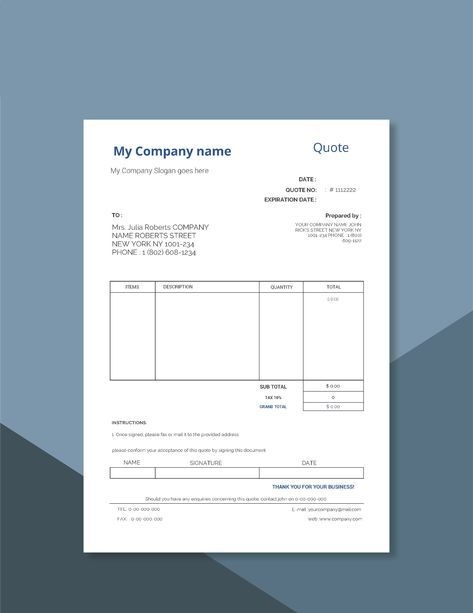
A specialized quotation management system focuses entirely on transaction details. It maintains your product catalog, applies volume-based pricing rules, calculates regional taxes, formats terms and conditions, and generates clean, official proposals.
If your products involve multiple line items, variants, or branch-specific pricing, a standard quotation management software ensures your reps don’t send out inaccurate pricing that eats into profit margins.
The Comparison: Standalone vs. Unified
To see where each system shines, let’s compare how different setups handle daily sales work:
The Hidden Cost of Running Disconnected Software
Many growing companies start by using a standard CRM for tracking leads, paired with a separate standalone quotation management software for sending offers.
That’s where things usually go wrong.
When systems don’t talk to each other seamlessly, several operational headaches pop up:
- Double Data Entry: Sales reps waste time copying client names, company addresses, and SKU details from one browser tab to another.
- Pipeline Blind Spots: The CRM shows a deal is in the “Proposal Sent” stage, but the sales manager can’t see the exact dollar amount quoted unless they log into the pricing tool.
- Version Chaos: A client calls back to accept a quote, but the sales rep isn’t sure if they are looking at revision 2 or revision 4.
- Tech Stack Fatigue: Your company pays monthly subscription fees for two separate platforms, plus additional integration tools like Zapier just to keep them synced.
Do You Really Need Two Separate Tools?
For most small to mid-sized businesses, distributors, and service providers, managing two distinct platforms creates unnecessary friction.
What you actually need is a modern CRM with quotation management built directly into its core engine.
Instead of jumping between apps, your team logs client activity, opens an active deal, selects the items from a pre-configured product library, and creates an official proposal with one click.
That’s exactly why platforms like Wortal combine full-suite CRM capabilities-like lead tracking, visit logs, and contact management-with a built-in quotation management system.
When pricing tools live inside your CRM, your workflow simplifies dramatically:
When a rep generates a price offer inside Wortal, the quote links directly to that client’s opportunity file. Everyone on your team-from sales managers to finance officers-sees the exact pricing history in real time.
- Set up custom quotation templates matched to their branding
- Uploaded their full product catalog with variant pricing
- Configured branch-specific quotation numbering series
The Results After 90 Days
In practical terms, field reps generated accurate proposals on their phones immediately after client meetings. Because official signatures and company stamps were pre-configured into the template, clients received polished, authentic proposals within minutes rather than days.
Key Features to Look For in a Unified System
If you decide to streamline your operations with a combined platform, ensure the quotation management system component includes these essentials:
1. Centralized Product & Variant Catalogs
Your sales team shouldn’t guess item prices or search through PDF price lists. The system must store product codes, descriptions, and stock variants in a unified database.
2. Branch-Specific & Tax-Aware Formatting
If you operate in regions with varying tax structures (such as regional GST breakdowns), your software must automatically apply appropriate rates based on client location or branch settings.
3. One-Click Document Generation
A sales rep should be able to convert an open deal into a finalized PDF proposal without re-typing client details or manual formatting.
4. Custom Approval Rules
To protect margins, quotes that offer discounts above a set threshold (e.g., 15%) should automatically route to a manager for sign-off before being dispatched.
5. Clear Audit Trails
Your team must see when a proposal was created, modified, sent, viewed, or approved-all directly from the client’s timeline inside your CRM with quotation management.
Practical Checklist: Which Route Should You Take?
Not every company needs the same tech stack. Use this quick assessment to choose the right path for your organization:
Option A: Standalone CRM Only
- Best for: B2B companies selling simple, fixed-price subscription services (e.g., SaaS with standard monthly plans) where custom proposals are rarely required.
Option B: Separate CRM + Standalone Quotation Management Software
- Best for: Global enterprises with massive, highly engineered product lines where CPQ (Configure, Price, Quote) engines require deep custom coding and dedicated admin teams.
Option C: All-in-One CRM with Quotation Management (Recommended)
- Best for: Manufacturers, regional distributors, wholesalers, field service agencies, and growing sales teams who need fast, error-free proposals linked directly to their customer database.
Key Takeaways
Most sales bottlenecks aren’t caused by a lack of effort; they are caused by tool fragmentation.
- Separate systems force sales reps to spend time doing administrative data entry instead of building client relationships.
- Standalone quotation tools add unnecessary software licensing costs for growing businesses.
- Adopting a unified quotation management system inside your CRM gives you full pipeline visibility while reducing proposal turnaround times from days to minutes.