
You promise a customer you’ll call back tomorrow. Tomorrow gets busy. Then the day after gets busier. By the time you remember, three days have passed – and the customer has already placed an order somewhere else.
This happens to almost every business at some point. Not because the team doesn’t care about customers. It happens because follow-ups are scattered across memory, sticky notes, and half-written notebook entries instead of being tracked in one place.
If you’ve ever lost a sale because you simply forgot to call someone back, this article is for you.
What is a Follow-Up?
A follow-up is just a planned next step with a customer or lead. A lead is simply someone who has shown interest in your business – maybe they asked for a price, visited your stall at an exhibition, or messaged you on WhatsApp asking about a product.
A follow-up could be:
- Calling a customer back with a quotation
- Sending a sample after a customer asks for one
- Checking if a customer received their order
- Reminding someone about a pending payment
It’s not complicated. It’s just remembering to do the next right thing, at the right time, for the right person.
Why Businesses Lose Sales Without Proper Follow-Ups
Most small businesses don’t lose sales because their product is bad. They lose sales because nobody followed up on time.
Here’s what usually happens:
- A customer’s number is saved in a phone, but no one remembers to call back
- A follow-up note is written on paper and the paper gets lost
- A salesperson quits, and all their customer conversations leave with them
- WhatsApp chats pile up and older conversations get buried
- An Excel sheet is updated by one person but nobody else checks it
None of these are really “systems.” They depend on someone remembering something, and human memory is not reliable, especially when you’re talking to fifteen customers a day.
What is Follow-Up Management Software?
Follow-up management software is a tool that remembers your pending tasks for you. Instead of relying on your memory or a notebook, you enter the follow-up once – customer name, date, time, and what needs to happen – and the software reminds you when it’s due.
Think of it like a very reliable assistant who never forgets, never gets tired, and never mixes up two customers by mistake.
Book a Free Demo
See how Wortal can simplify your business and help you close more deals.


What is a Sales Follow-Up CRM?
Before explaining a sales follow-up CRM, let’s talk about CRM itself. CRM stands for Customer Relationship Management. In simple words, it’s software that stores all your customers and lead details in one place – their contact number, what they asked for, what you promised them, and what happened after.
A sales follow-up CRM adds one more layer on top of this. It doesn’t just store customer information – it actively reminds your team when a follow-up is due, so nothing slips through the cracks. This is the difference between a CRM for sales teams and just a plain contact list.
How Wortal CRM Makes Follow-Ups Easy
Wortal CRM was built with small businesses in mind – textile traders, manufacturers, distributors, wholesalers, and retailers who are usually managing customers over WhatsApp, phone calls, and in-person visits.
Instead of juggling all of that in your head, Wortal CRM gives every lead a proper place to live, along with a follow-up schedule attached to it. You always know who to contact today, who’s overdue, and what was discussed last time.
Step-by-Step Tutorial
Step 1: Open a Lead
Every follow-up starts with a lead. Open the lead’s profile inside Wortal CRM – this could be someone who enquired at your shop, called you, or was scanned in from a visiting card at an exhibition.
Step 2: Create a Follow-Up
Inside the lead’s profile, you’ll see an option to add a follow-up. Fill in three simple things:
| Field | What to enter |
|---|---|
| Date | When you plan to contact them |
| Time | Preferred time slot for the call |
| Notes | What you discussed or need to discuss |
Beginner tip: Always write a short note, even one line, like “Wants price for 500 meters cotton fabric.” Your future self will thank you.

Step 3: Save It
Once saved, the follow-up moves into your task list automatically. You don’t need to remember it separately anymore – Wortal CRM does that part.
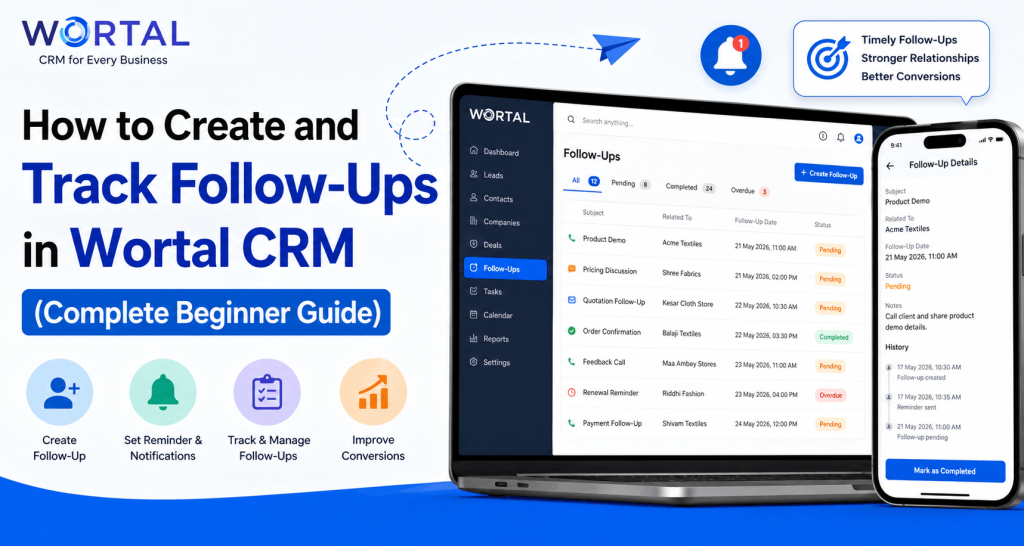
Step 4: Track Upcoming Follow-Ups
Wortal CRM organizes your follow-ups into simple categories:
- Today’s – due right now
- Upcoming – scheduled for later
- Completed – already done
- Overdue – missed the date

This one screen tells you exactly where you stand with every customer, without opening ten different chats.
Step 5: Open Follow-Up History
Before calling a customer, open their follow-up history. You’ll see everything discussed earlier. No more asking “sorry, what did we talk about last time?” – a mistake that makes customers feel forgotten.
Step 6: Complete the Follow-Up
After the call, mark the follow-up as complete and add a quick note on what happened. Did they confirm the order? Ask for a discount? Need more time to decide?
Step 7: Create the Next Follow-Up
If the deal isn’t closed yet, don’t leave it hanging. Create the next follow-up immediately, right after completing the current one. This single habit is what separates businesses that convert leads consistently from ones that lose them halfway.
Real Example
Rohan runs a textile shop in Surat. At a trade exhibition, a visitor shows interest in his fabric range. He scans the visitor’s visiting card straight into Wortal CRM instead of collecting a pile of cards he’ll never look at again.
The system creates a lead automatically, and Rohan schedules a follow-up for three days later. When the reminder comes up, he calls the customer, references the exact conversation from the exhibition, and closes an order that would otherwise have been forgotten in a drawer full of business cards.
Benefits of Using Wortal CRM for Follow-Ups
You stop depending on memory. Every follow-up, past or upcoming, is visible with one click.
Your team stays consistent even when someone is on leave, since all conversation history is saved against the lead, not against a person.
Customers notice when you remember details from your last conversation. It builds trust, and trust is what actually drives lead conversion in B2B sales.
Best Practices
- Always add a note with every follow-up
- Never leave a follow-up without a next date, unless the deal is closed or lost
- Check overdue follow-ups first thing every morning
- Read the history before every call
- Keep follow-up notes short and specific
- Set realistic dates – don’t promise “tomorrow” if you know you’re busy
- Review your sales pipeline weekly, not just daily
- Assign follow-ups clearly if you have a team
- Mark follow-ups complete right after the call, not hours later
- Treat every follow-up as a chance to build the relationship, not just close a sale
Common Mistakes
Scheduling follow-ups without notes – you’ll forget the context within a day or two.
Waiting too long between follow-ups – customers move on quickly if they feel ignored.
Calling without checking history – nothing frustrates a customer more than repeating themselves.
Ignoring overdue follow-ups – an overdue follow-up isn’t a task to skip, it’s a warning sign that a sale might slip away.
Frequently Asked Questions
Final Thoughts
Good follow-up habits help you respond on time, remember every customer conversation, and improve your chances of converting leads. None of this needs to be complicated – it just needs to be consistent.
A tool like Wortal CRM simply makes this process easier by keeping everything organized in one place, so nothing depends on memory alone.